

Payment gateways (Comgate, GoPay)
- 1 Introduction
- 2 Payment for registration prolongation
- 3 Payment of outstanding charges
- 4 Comgate payment gateway
- 5 GoPay payment gateway
- 6 References
Introduction
The Tritius library system, in its web catalogue module, allows readers to make card payments for certain operations:
- Payment of charges (reminders, fines, etc.)
- Registration prolongation
For card payments, Tritius uses the services of the payment gateway Comgate or GoPay.
The library concludes a contract directly with the provider of the selected gateway,
The payment gateway module in the Tritius catalogue is charged according to the price list, including subsequent updates.
The library has access to a web interface where it can view settlements and display payment details.
Payment for registration prolongation
- Registration prolongation via the catalogue must be enabled by the setting: CATALOG_REGISTRATION_PROLONGATION_ENABLED
- Before the end of the registration, the reader is shown a notification in the catalogue about the expiring registration.
- When the notification is displayed can be adjusted by the setting: CATALOG_REGISTRATION_PROLONGATION_PERIOD
- After clicking the notification about the expiring registration, a page listing the expiring registrations is displayed
- There may be several registrations at different departments
- By clicking the "Prolong registration" button, the reader can prolong individual registrations.
- After clicking the "Prolong registration" button, the reader is shown a page with a summary of information:
- The date from which the new registration will be valid.
- The date until which the new registration will be valid.
- At which departments the registration will be valid (including linked departments).
- A checkbox confirming that the reader agrees with the library rules (or a link to the library rules).
- At the end of the page there are two options to choose from:
- Confirm and pay - the card payment is displayed, the reader pays and the registration becomes fully valid.
- Confirm and create debt - a debt is created and the registration is prolonged. The reader can continue to use the library services, but some may be restricted.
- When the reader first comes to the library after prolonging by card, the librarian is shown a notice (so that she can check the details).
- The reader can also display the list of active registrations from the user menu under the "My registrations" link.
Payment of outstanding charges
- The reader's total debt is displayed in the reader menu.
- In the reader menu, the number of currently outstanding charges is also displayed next to the "My Charges" link.
- After clicking the total amount, the list of outstanding charges is displayed.
- If card payments are enabled, a "Pay" button is displayed below the list, which redirects the reader to the GoPay payment gateway and allows them to pay their outstanding charges.
- The catalogue contains the setting PAYMENT_GATE_MINIMAL_AMOUNT specifying the minimum amount that can be paid via the payment gateway.
Comgate payment gateway
Web: https://www.comgate.cz/cz
Current price list: https://www.comgate.cz/cz/cena
Client portal: https://portal.comgate.cz/cs/site/index
Documentation: https://portal.comgate.cz/cs/dokumentace
Concluding the contract: https://help.comgate.cz/docs/smlouva-online
Articles:
- Comparison of payment gateways: https://www.comgate.cz/cz/blog/srovnani-platebnich-bran
Payment terms
One-off fees
| Setting up the payment gateway | 0,- |
| Daily transfer of money to the client's bank account | 0,- |
| EET in the payment gateway | 0,- |
| Cancelling the payment gateway | 0,- |
| Refund (returning funds to the Payer at the Client's request) | 2 CZK |
| Chargeback (forced return of funds to the Payer based on the Payer's complaint) | 990 CZK |
Monthly administration fees and percentage transaction fees (ask about current prices)
| Monthly transaction volume | up to 100,000 CZK/month | 100,000-500,000 CZK/month | 500,000 CZK-3 million CZK/month |
|---|---|---|---|
| Monthly fee | 149 CZK | 99 CZK | 0 CZK |
| Transaction fee | 0.99% + 0 CZK | 0.89% + 0 CZK | 0.79% + 0 CZK |
Gateway settings in Tritius
The use of the payment gateway in the catalogue must be enabled and configured.
Key | Type | Description |
|---|---|---|
| CATALOG_SHOW_TERMS_AND_CONDITIONS_PAGE | Boolean | Enables display of the page with payment terms |
| CATALOG_SHOW_PRICE_LIST_PAGE | Boolean | Enables display of the price list page |
| CATALOG_CARD_PAYMENT_ENABLED | Boolean | Enables card payments in the catalogue |
| CATALOG_REGISTRATION_PROLONGATION_ENABLED | Boolean | Enables registration prolongation |
| CATALOG_REGISTRATION_PROLONGATION_PERIOD | Int | Number of days before the end of the registration from which the registration can be prolonged. The default is 31 days. |
IS_ENABLED_TO_PROLONG_EXPIRED_REGISTRATIONS | Boolean | Enables prolongation of an expired registration in the catalogue |
| COMGATE_MERCHANT | String | Comgate customer identifier You will receive it after signing the contract with Comgate. |
| COMGATE_SECRET | String | Password You will receive it after signing the contract with Comgate. |
| COMGATE_TEST | Boolean | Test operation flag. Access to the Comgate test mode is required. |
| PAYMENT_GATE_MINIMAL_AMOUNT | Int | Minimum amount that can be paid via the gateway. The default is 10 CZK. |
| CATALOG_ENABLE_PAYMENTS | Boolean | Enables payments in the catalogue. Enabled by default. It can be set down to the level of an individual user. Useful, for example, for enabling a single user to test the payment gateway. |
The Comgate payment gateway requires the presence of terms and conditions on the institution's website. For this purpose Tritius has a separate page, linked from the catalogue footer and defined in the Catalog html templates setting. See for example: https://katalog.svkul.cz/page/terms-and-conditions
When editing the Html template, it is necessary to keep the default tag structure and write your own text between these tags.
Gateway settings in Comgate
In the settings of the Comgate payment gateway, the URLs must be set so that they point to Tritius. Main menu → Integrations → Store settings.
Comgate documentation: https://help.comgate.cz/docs/navod-k-pouziti#propojen%C3%AD-obchodu
| Parameter | Value |
|---|---|
| URL paid | https://x.tritius.cz/comgate/paid?id=${id}&refId=${refId} |
| URL cancelled | https://x.tritius.cz/comgate/canceled?id=${id}&refId=${refId} |
| URL pending | https://x.tritius.cz/comgate/pending?id=${id}&refId=${refId} |
| URL for passing the payment result | https://x.tritius.cz/comgate/status |
| Allowed IP addresses | IP address of the VM or proxy. |
GoPay payment gateway
GoPay terms
Unfortunately, GoPay no longer has common contract terms for libraries.
The contract terms are now negotiated individually with each library, and more favourable terms can be agreed based on the turnover achieved.
Registering with GoPay
First you need to register with GoPay using the following link:
https://registration.gopay.com/cs/signup-supplier/tritius
A form follows in which you fill in, among other things, the following details:
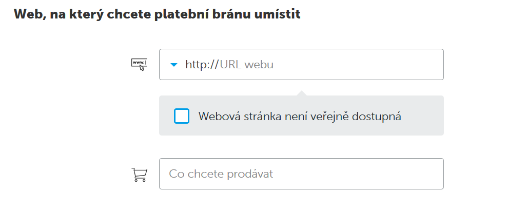
Here you enter the address of your own web catalogue (most often: <library name>.tritius.cz).
You will not tick the checkbox because the website is publicly accessible.
You will be selling: registrations and payment of readers' debts
Gateway settings in Tritius
The use of the payment gateway in the catalogue must be enabled and configured.
Key | Type | Description |
|---|---|---|
| CATALOG_SHOW_TERMS_AND_CONDITIONS_PAGE | Boolean | Enables display of the page with payment terms |
| CATALOG_SHOW_PRICE_LIST_PAGE | Boolean | Enables display of the price list page |
| CATALOG_CARD_PAYMENT_ENABLED | Boolean | Enables card payments in the catalogue |
| CATALOG_REGISTRATION_PROLONGATION_ENABLED | Boolean | Enables registration prolongation |
| CATALOG_REGISTRATION_PROLONGATION_PERIOD | Int | Number of days before the end of the registration from which the registration can be prolonged. The default is 31 days. |
| IS_ENABLED_TO_PROLONG_EXPIRED_REGISTRATIONS | Boolean | Enables prolongation of an expired registration in the catalogue. |
| GOPAY_URL | String | URL of the GoPay gateway. https://gate.gopay.cz/api/ |
| GOPAY_ID | String | GoPay customer ID. You will receive it after signing the contract with GoPay. |
| GOPAY_CLIENT_ID | String | GoPay client number for the API. You will receive it after signing the contract with GoPay. |
| GOPAY_SECRET_KEY | String | GoPay password for the API. You will receive it after signing the contract with GoPay. |
| PAYMENT_GATE_MINIMAL_AMOUNT | Int | Minimum amount that can be paid via the gateway. The default is 10 CZK. |
| CATALOG_ENABLE_PAYMENTS | Boolean | Enables payments in the catalogue. Enabled by default. It can be set down to the level of an individual user. Useful, for example, for enabling a single user to test the payment gateway. |
The GoPay payment gateway requires the presence of terms and conditions on the institution's website. For this purpose Tritius has a separate page, linked from the catalogue footer and defined in the Catalog html templates setting. See for example: https://klatovy.tritius.cz/page/terms-and-conditions
When editing the Html template, it is necessary to keep the default tag structure and write your own text between these tags.
Libraries that have already written their terms and conditions can serve as inspiration:
References
- 07/2020 - North Bohemian Research Library in Ústí nad Labem (Comgate)
- 08/2020 - Ostrava City Library (Comgate)
- 09/2020 - Třinec Municipal Library (Comgate)
- 10/2020 - Klatovy Municipal Library (GoPay)
- 03/2021 - Hodonín Municipal Library (Comgate)
- 04/2021 - Jindřichův Hradec Municipal Library (Comgate)
- 05/2021 - Jihlava Municipal Library (Comgate)