

Graphic guide to ILL for periodicals
The ILL tab is used for creating and managing interlibrary loan requests. On the Outgoing ILS requests tab we can easily filter existing requests by their state using the filter on the right side of the screen. To create a new request, we click the Create button.
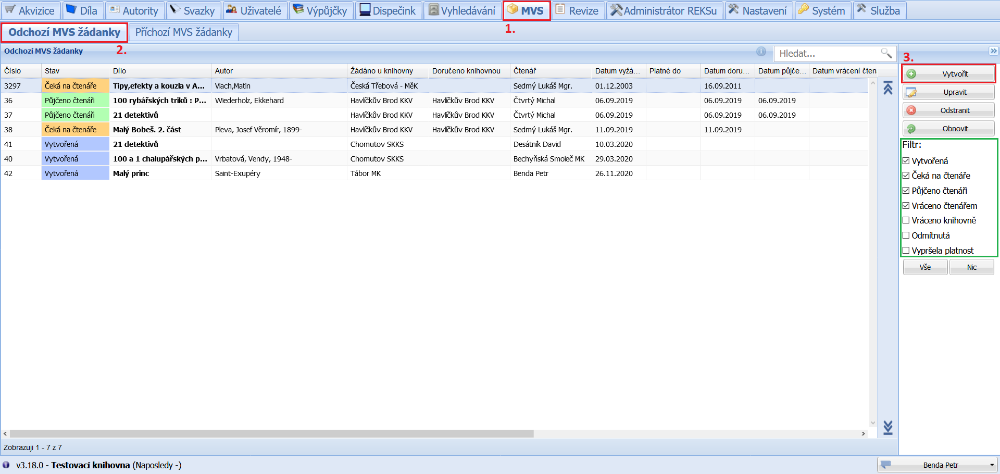
(fig. 1)
Creating a request for periodicals is very similar to the other document types. First, in the dropdown we select the work type Periodicals. Then it is enough to write into the request manually the details we know about the periodical. Next we select the reader for whom we are creating the request and the library from which we will request the document. If we do not yet have the library from which we are requesting the document entered in the system, we use the icon to the right of the dropdown to create it. Then it is necessary to fill in the periodical year and the periodical issue. The request number and the date requested are filled in automatically. We can also fill in a thematic group or a note. When we have the request filled in, we save it by clicking the Save and close button.
Then we work with the request in the same way as described in the Graphic guide to ILL from figure 3.
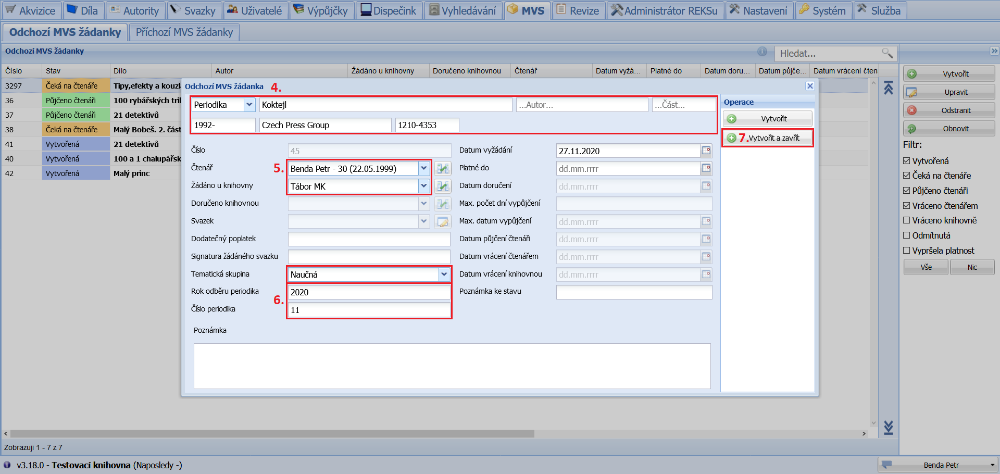
(fig. 2)